Keyboard shortcuts
Run the whole browser from the keyboard
- Cheat sheet
- ⌘/
- Rebind in
- Settings › Shortcuts
- Fixed keys
- Tab and space numbers, Esc, Undo/Redo, ⌘Q
- New binding
- ⌘ or ⌃ plus a key
- Shortcuts shown
- macOS keys
Which shortcuts matter most?
The defaults follow macOS conventions and add keys for what Tarn does differently.
- ⌘T new tab, ⌘L edit the address, ⌘W close, ⇧⌘T reopen
- ⌘1 to ⌘8 select a tab, ⌘9 the last one, ⌃⇥ and ⌃⇧⇥ cycle tabs
- ⌃1 to ⌃9 switch space, ⇧⌘S new space, ⇧⌘N private space
- ⌃⌘N Split View, ⌘D pin a tab, ⌥⌘G new tab group
- ⇧⌘C copy link, ⌥⇧⌘C copy it as Markdown
- ⌘S show or hide the sidebar, ⇧⌘A open the library
How do I see every shortcut?
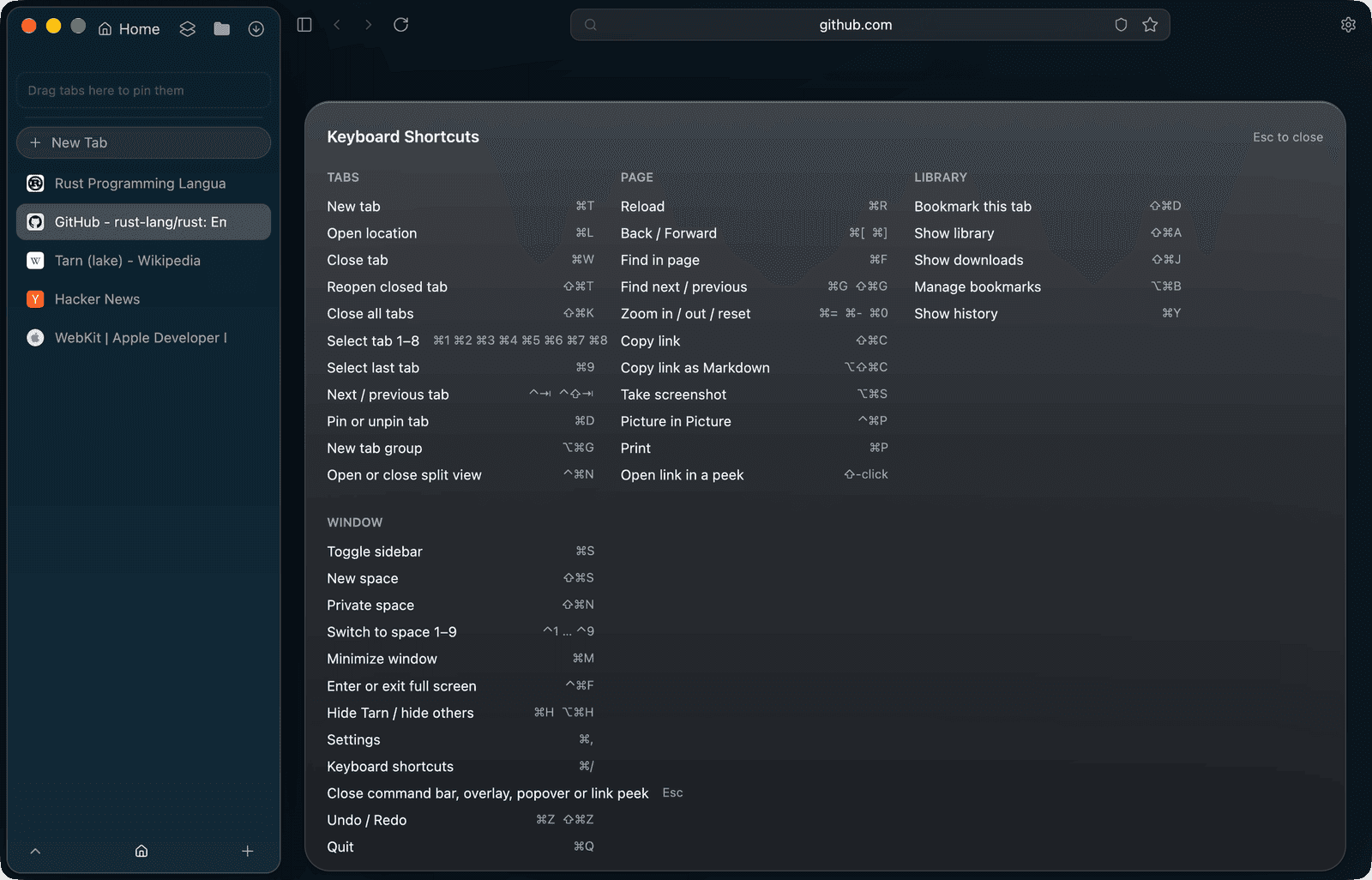
Press ⌘/ or choose it in the View menu. The cheat sheet lists the same groups as Settings › Shortcuts with the keys currently set, and Esc or ⌘/ closes it.
Can I change a shortcut?
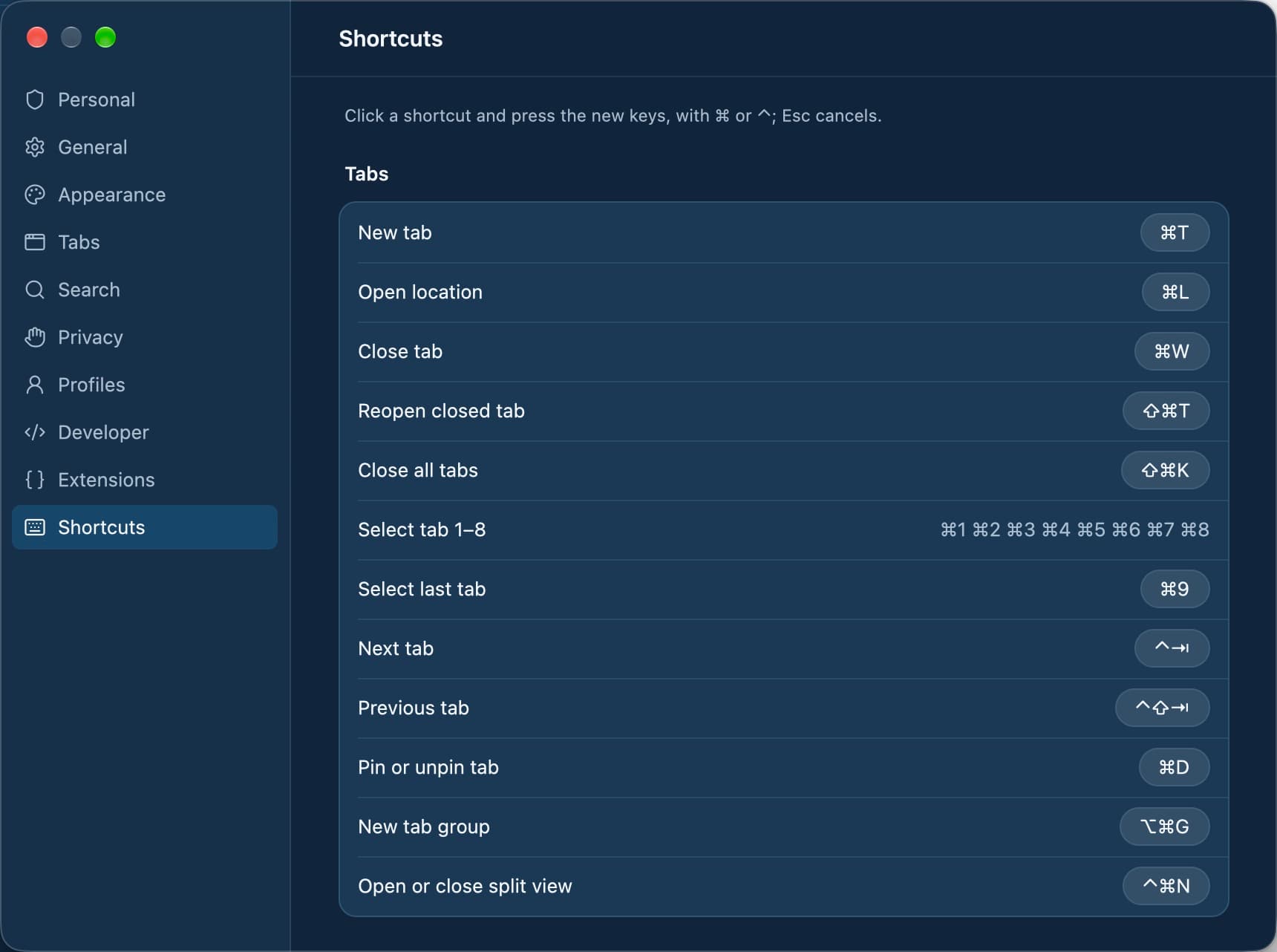
Yes. In Settings › Shortcuts, click a row and press the new keys, ⌘ or ⌃ plus a key, or Esc to cancel. Keys already used by another row are refused with that row named. Each changed row has Reset, and Reset All restores every default.
What about the trackpad and mouse?
With trackpad gestures on in Settings › Tabs, swipe over the sidebar to switch spaces, over the address field to step through tabs, and right over the toolbar to show the sidebar. The mouse's back and forward buttons always navigate.
Questions
How do I open the shortcut list?
Press ⌘/. It opens a cheat sheet over the window; press Esc or ⌘/ again to close it.
Do the menus update when I change a shortcut?
Yes. The menus, the cheat sheet, the command bar, toolbar tooltips and the tab and sidebar menus show the current keys.
Can I undo my custom shortcuts?
Yes. Each changed row in Settings › Shortcuts has Reset, and Reset All restores every default.
What happens if I pick a key that is already taken?
Tarn refuses it and names the row that already uses it, so two actions never share a key.
Is there a shortcut to open a link without leaving the page?
Yes. ⇧-click a link to open it in a peek over the page; Open in Tab keeps it, and Esc closes it.
Can I close all tabs at once?
⇧⌘K closes all tabs. ⇧⌘T reopens a closed tab.
What it does not do
- Tab numbers, space numbers, Esc, Undo and Redo and ⌘Q cannot be rebound.
- A new binding needs ⌘ or ⌃; text-field keys such as ⌘C, ⌘V and ⌘A and ⌘⇥ are refused.
- The shortcuts shown here are the macOS defaults; other clients follow their platform's keys and are in development.
Last reviewed
Try Tarn on your Mac
No account to make and nothing sent home. macOS 14 or later; other platforms are in development.