Split View and link peek
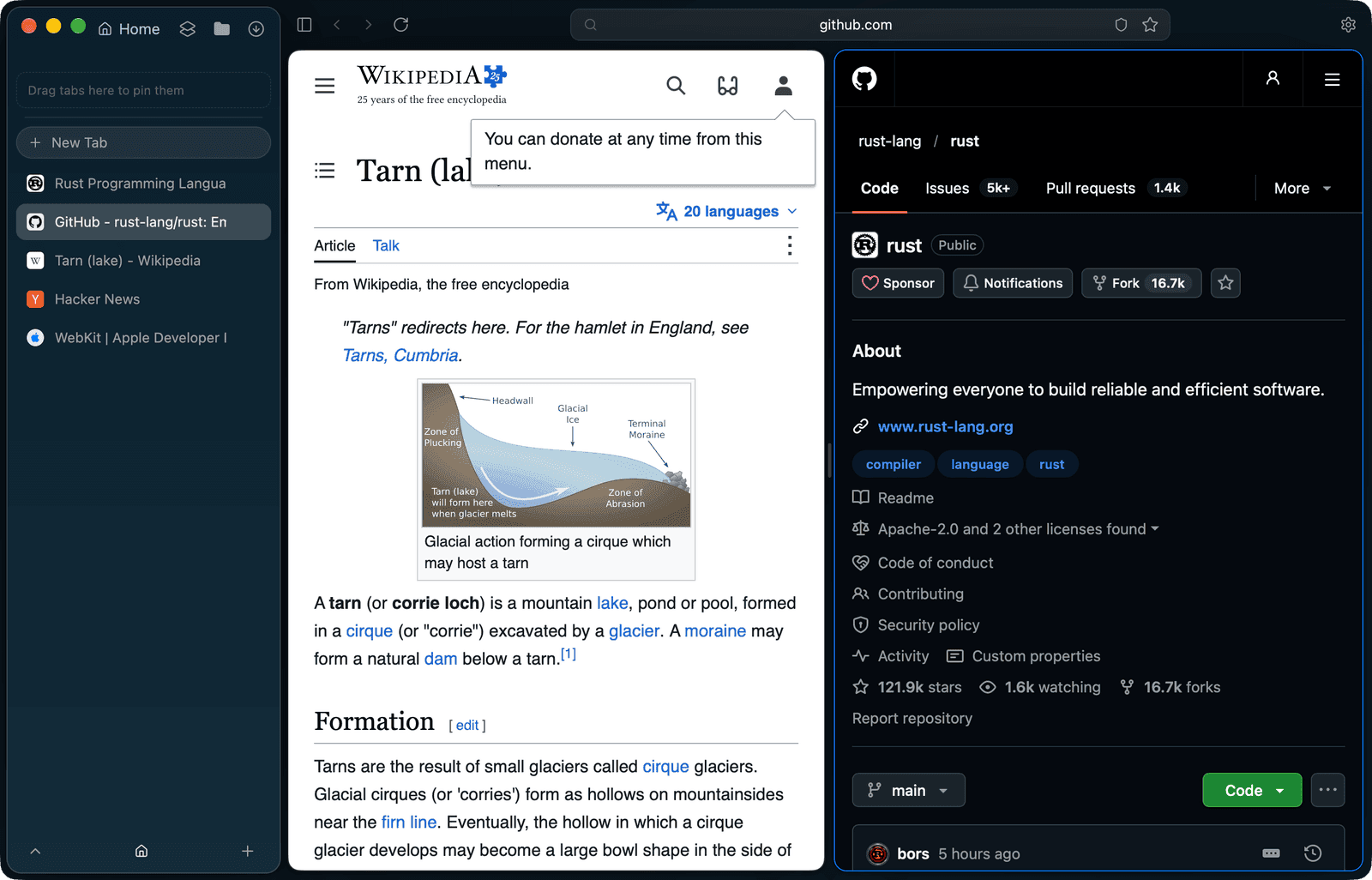
Two pages at once, without a second window
- Shortcut
- ⌃⌘N opens or closes Split View
- Pairing
- The current tab beside the space's last used tab
- Divider
- Draggable; each pane keeps at least 20 %
- Link peek
- ⇧-click a link; Open in Tab or Esc
- Sleep
- Split panes are never put to sleep
How do I open two tabs side by side?
Press ⌃⌘N, or choose Open Split View from the Tabs menu or a tab's menu. The current tab opens beside the tab you used last in the same space. If the space has no other tab, the split opens on a copy of the current one.
- Each pane is its own native web view
- Drag the divider; neither pane gets narrower than 20 %
- ⌃⌘N again closes the split
Which pane do my shortcuts act on?
The focused pane is the active tab. It carries an accent border and its address shows in the toolbar. A left click in the other pane moves the focus there, so ⌘L, ⌘R and the rest follow where you clicked.
What is link peek?
⇧-click a link and it opens in a large card over the page you are reading. The peek uses the same profile data and the same Shield level as a tab would, so a site under Lockdown still has JavaScript off. Open in Tab moves the page, with its history, into a new tab; Esc, Close or a click outside the card closes it.
- A ⇧-click inside the peek loads there
- Dialogs and pop-ups from the peek are declined
- In a private space the peek stays in memory like the space
When does a split end?
Activating any other tab, closing or unloading one of the panes, or pressing ⌃⌘N again ends the split. While it is open, both panes count as live, so the tabs-kept-awake limit never puts the partner to sleep.
Questions
What is the shortcut for Split View in Tarn?
⌃⌘N opens Split View with the current tab beside the space's last used tab, and closes it again. It is also in the Tabs menu and in each tab's menu.
Can I choose which tab goes in the second pane?
⌃⌘N pairs the current tab with the tab you used last in the same space. To pair a different tab, visit it first, then switch back and press ⌃⌘N.
Can I resize the two panes?
Yes. Drag the divider between them. Each pane keeps at least 20 % of the width.
How do I open a link without leaving the page?
Hold ⇧ and click the link. It opens in a peek over the page; Open in Tab keeps it as a tab with its history, and Esc or a click outside closes it.
Does link peek follow my Shield settings?
Yes. The peek's web view is built like a tab's, with the same profile data, content rules and Shield level for the link, so Lockdown keeps JavaScript off there too.
Will a tab in Split View go to sleep?
No. The active tab and both split panes never sleep, and the tabs-kept-awake limit leaves the partner pane alone while the split is open.
What it does not do
- A split holds two tabs, not three or four.
- A split is not saved: it ends when you switch to another tab and does not come back after a restart.
- The page's own right-click menu has no Open Link in Peek, because WebKit offers no public way to add items there. Use ⇧-click.
- Split View and link peek are documented for the macOS app. Windows, Linux, iOS and Android are in development and not released.
Last reviewed
Try Tarn on your Mac
No account to make and nothing sent home. macOS 14 or later; other platforms are in development.