Privacy first
The web, without being followed
- blocked
- 0
- cleaned
- 0
- passed
- 0
- Trackers and ads blocked✓on
- Tracking parameters stripped✓on
- Local network kept out of reach✓on
- HTTPS onlyoff
- No cross-site referreroff
- JavaScript offoff
- No site data keptoff
Trackers follow you from site to site
Shield is on at Standard for every new profile. It blocks trackers and ads, strips tracking parameters from links and keeps public pages off your local network. Strict adds HTTPS-only and no cross-site referrer; Lockdown turns off JavaScript and keeps no site data.
Ads and cookie banners bury the page
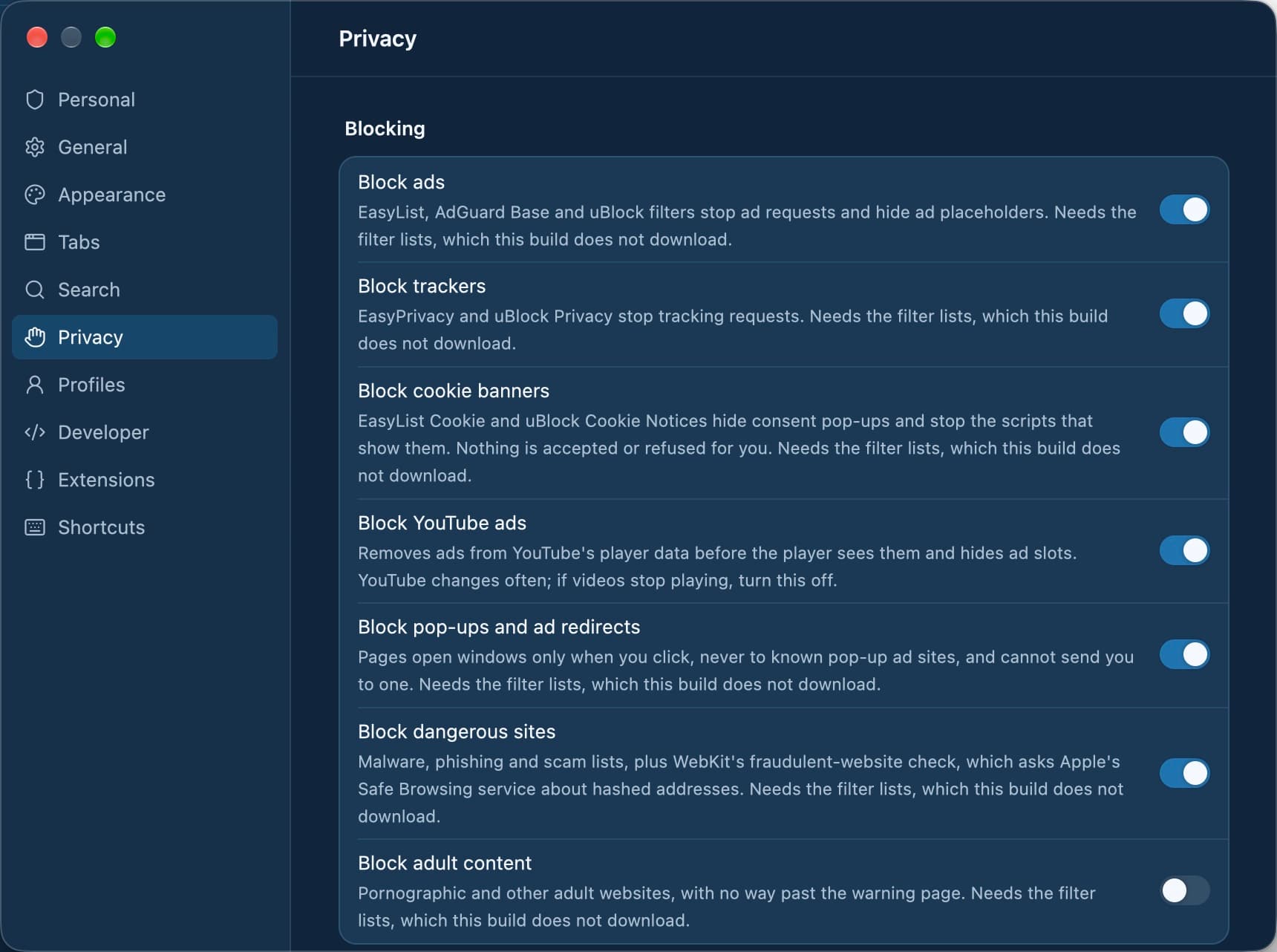
Ad blocking covers ads, trackers, cookie banners, YouTube ads, pop-ups and dangerous sites, each a switch in Settings › Privacy. The lists are signed and updated daily, and ads, trackers and cookie banners can be turned off for one site from the Shield button.
A link you do not trust
A burner tab (⌥⇧⌘N) opens one throwaway tab with its own in-memory data store at Strict. It records no history and is gone the moment it closes. For a longer private session, a private space (⇧⌘N) keeps everything in memory and writes none of it to disk.
A browser that reports back
Tarn has no accounts, no telemetry and no servers of its own. Apart from the pages you open, the browser makes only the requests listed in Settings › Privacy › Connections Tarn makes, such as the update check and the filter-list update.
Set Tarn up for privacy
- Download Tarn for macOS and open it. A new profile starts at Shield Standard, so trackers and ads are blocked from the first page.
- Press ⌘, to open Settings and choose Strict in Privacy if you want HTTPS-only and no cross-site referrer.
- In Settings › Privacy, check which blocking switches are on. Adult-site blocking is the one that starts off.
- Press ⇧⌘N for a private space or ⌥⇧⌘N for a burner tab whenever a visit should not be kept.
- Read Settings › Privacy › Connections Tarn makes to see every request the browser itself sends.
Where Tarn falls short
- Tarn does not offer deep fingerprinting protection; WebKit does not make it possible, so sites may still recognise a device across sessions.
- Private browsing hides your activity on your Mac, not from the sites you visit or your network.
- Encrypted DNS inside the app is not possible on WebKit.
- No blocker catches every ad: ads served from the same host and path as content get through.
- Tarn ships on macOS today; Windows, Linux, iOS and Android are in development.
Questions
Does Tarn collect any data about me?
No. Tarn has no accounts, no telemetry and no servers of its own. History, cookies, cache and settings are stored only on your Mac, separately for each profile.
Which Shield level should I use?
Standard suits everyday browsing and is the default for new profiles. Use Strict when you want HTTPS everywhere, and Lockdown for sites you do not trust or need to read without scripts.
Does Tarn protect against fingerprinting?
Not deeply. WebKit does not make deep fingerprinting protection possible, and Tarn keeps Safari's user agent rather than a custom one.
Which servers does the browser contact on its own?
An update check and a filter-list update on GitHub, and WebKit's fraudulent-website check, which sends shortened hashes of addresses rather than the addresses. Settings › Privacy › Connections Tarn makes lists them all.
Can I delete everything a profile stored?
Yes. Settings › Privacy › Your data exports a profile's data as JSON and deletes its spaces, tabs, history, site settings and WebKit cookies, cache and storage. Files you downloaded stay.
Try Tarn on your Mac
No account to make and nothing sent home. macOS 14 or later; other platforms are in development.